Free · Open source · Windows 10 & 11

One app.
All your VPNs.

Your company's Cisco AnyConnect, a client's FortiGate, a GlobalProtect portal and your own OpenVPN, side by side in one small window. No more juggling four clients.

MIT licensedInstalls what it needsUpdates itself
All tunnels down. Flip one on.
CISCOWorkvpn.company.com
FORTIClient projectfortigate.client.io:10443
GPPartner portalgp.partner.net
OVPNHome labhome.example.net:1194

Fewer clients. Less faff.

Every VPN vendor wants its own app on your PC. Molehill speaks all four protocols and gets out of your way.

Before

  • Four VPN clients, four tray icons, four update nags
  • Only one can be connected at a time, or they fight over the network
  • Hunting down installers and the right versions for every one
  • Typing the same password again, every single morning
→

With Molehill

  • One small app and one tray icon whose colour tells you what's up
  • Several VPNs connected at once, each with its own switch
  • The engines are installed, verified and kept up to date for you
  • Passwords saved safely in Windows; only the 2FA code is asked

Everything sign-in throws at you

Group lists, SMS codes, authenticator apps, browser SSO, untrusted certificates, client certificates. Molehill handles them right where you are.

⇄

Several VPNs at once

Work, client and home can all be up together. Each connection has its own switch; one master switch turns them all off.

#

Sign-in on the card

Whatever the server asks (a group, an SMS or authenticator code, a FortiToken push) appears right on the connection, filled in where it can be.

↗

Browser SSO

Microsoft Entra, Okta, Google: the company sign-in page opens in your own browser and hands the session back to Molehill.

✓

Passwords remembered safely

Stored in Windows Credential Manager, never in plain files. A mistyped code is never mistaken for a wrong password.

⚿

Certificates, handled

Trust a company's own server certificate once, pinned from then on. Servers that want your client certificate get it from the Windows store.

↻

Keeps itself current

OpenVPN and OpenConnect are installed and updated for you, and Molehill tells you when there's a new version of itself.
Small, flat and quiet

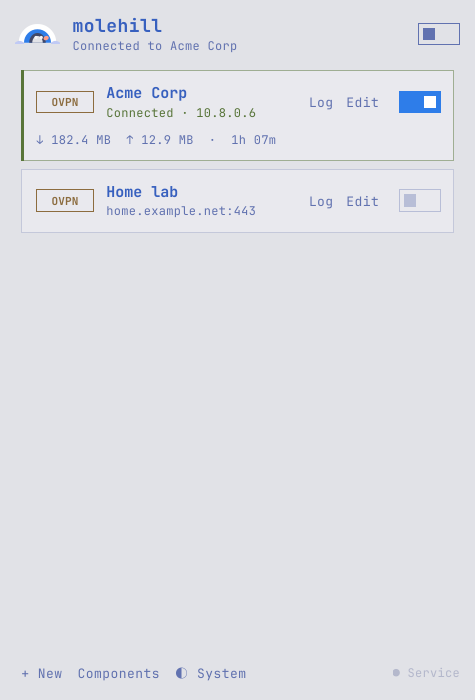
A Tokyo Night look borrowed from Omarchy, in dark or light, following your Windows theme. Drag connections into your order; close the window and the tunnels stay up.

Molehill– ×
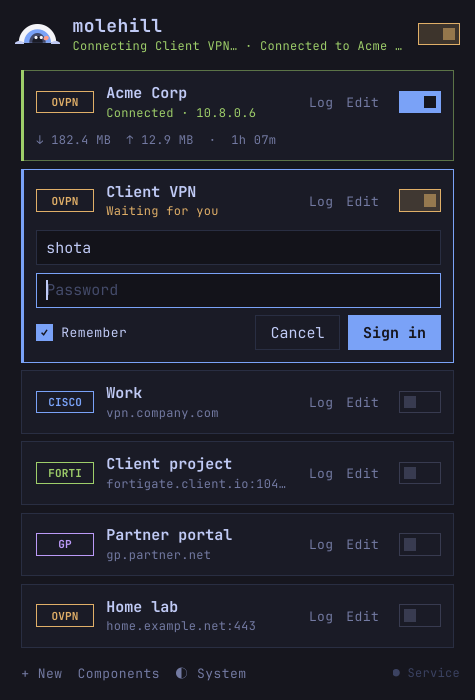
Molehill's list: one VPN connected, one asking for a password
Several tunnels, one window
Molehill– ×
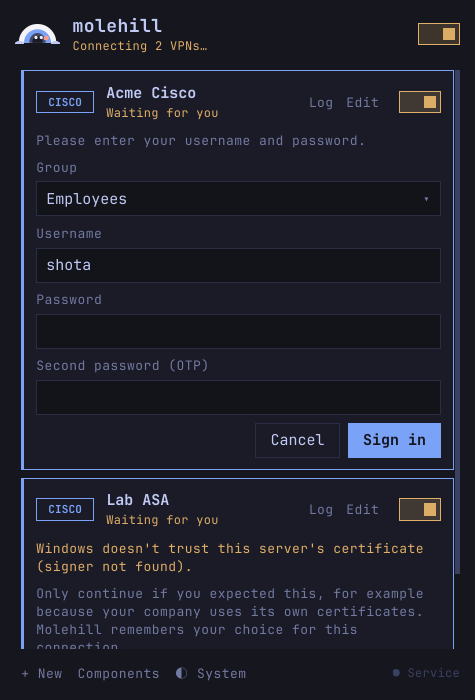
A Cisco login form and a certificate prompt on the cards
Sign-in right on the card
Molehill– ×
Molehill in the light theme
Light, when Windows is

The mole tells you

One look at the tray, or the dot on the taskbar button, and you know where you stand.

Idlenothing connected
Connectingsigning in

Connectedone VPN up

Severalmore than one up

Faileda connection failed

Offlineservice stopped

Up and tunnelling in a minute

No prerequisites to hunt for.

Download & install

Run the installer. It sets up Molehill and its small background service.

Add a connection

Pick the protocol, type the server address your IT gave you. For OpenVPN, choose the .ovpn file.

Flip the switch

Sign in on the card. Molehill installs the VPN engine the first time it's needed.

Windows may say "Windows protected your PC" because the installer isn't code-signed yet. Click More info → Run anyway. The source and every build are on GitHub.

Dig in.

Free and open source, for anyone who needs more than one VPN.